
Live temperature and RPM
Reads real hardware first. If write access is unavailable, the site still reflects the readable monitoring view and the current state.
macOS fan control and temperature monitoring
Put CPU temperature, fan RPM, automatic mode, and full-speed switching into a clean desktop utility. The site reads well on mobile, while the installer targets macOS 13 and later.
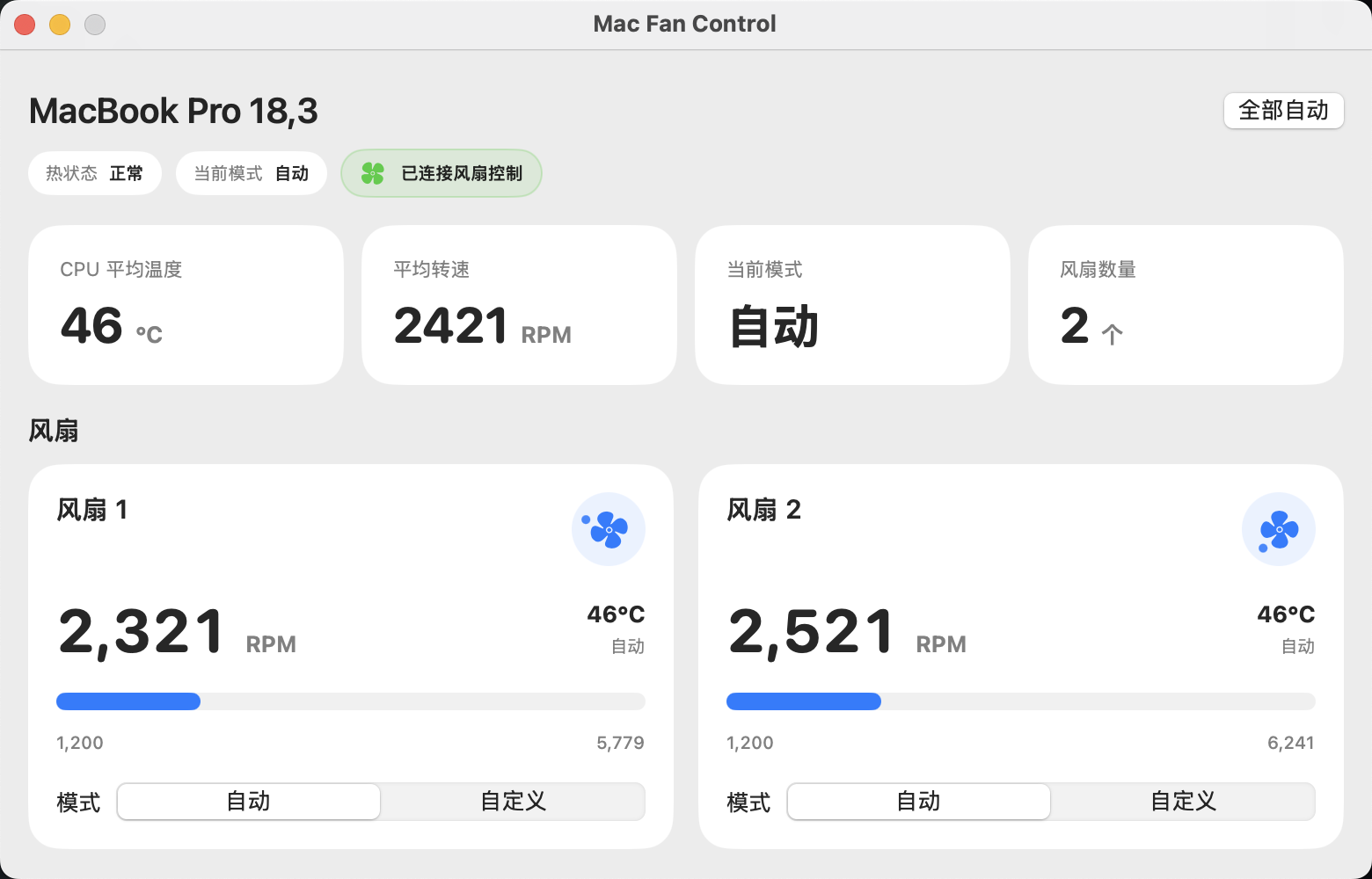
Interface preview
The home screen surfaces the current Mac model, thermal status, average temperature, average RPM, and the mode of each fan. When you need to intervene manually, you do not have to jump across separate panels.
Core features
Each section maps directly to capabilities that already exist in the repository, so the copy does not drift ahead of the product.
Reads real hardware first. If write access is unavailable, the site still reflects the readable monitoring view and the current state.
Useful for short cooling bursts, heavy builds, video exports, and similar workloads. You can return to automatic mode quickly when the task is done.
When available, the app shows a connected fan-control state. When it is not ready yet, the page clearly separates monitoring, helper installation, and preview paths.
On devices that are not suitable for direct fan writes, the app falls back to low-power mode, heavy-process observation, and system-level cooling paths.
Use cases
High-load phases like code builds, video exports, and image packaging are exactly when you need a quick signal on whether to push cooling harder.
When noise and temperature balance matter more than brute force, automatic mode and low-power strategies are more useful than forcing max speed.
The page states clearly whether the current device is in live control, helper-pending, monitoring-first, or fanless mode so users do not have to guess.
Compatibility
Different Macs, architectures, and permission states follow different paths, and the website explains those branches the same way the product does.
On fan-equipped Macs with the helper ready, the app shows real RPM and the active mode, which is ideal for devices that need direct fan intervention.
Real telemetry is already available, but write access is not connected yet. This path fits users who want to monitor first and decide on helper installation later.
Some architectures or bridge conditions keep viewing support first and avoid promising unverified hardware writes.
On fanless Macs and some scenarios, the UI falls back to a steadier route built around temperature visibility, low-power mode, and heavy-process inspection.
Download
The page is easy to browse and share from a phone, but the installer is still a macOS app. For the smoothest setup, download and install it directly on a Mac.
FAQ
No. The site is mobile-friendly, but the download is still a macOS desktop application.
The repository applies compatibility rules based on the Mac model, architecture, and permission state. If the requirements are not met, it falls back to monitoring or system cooling paths.
Not necessarily for temperature and fan monitoring alone. Real write control prompts for the helper only on supported hardware.
Pro access
If you plan to make the iOS client's custom mode a paid feature, this site can already carry the full Stripe Checkout, email recovery, and entitlement lookup flow.